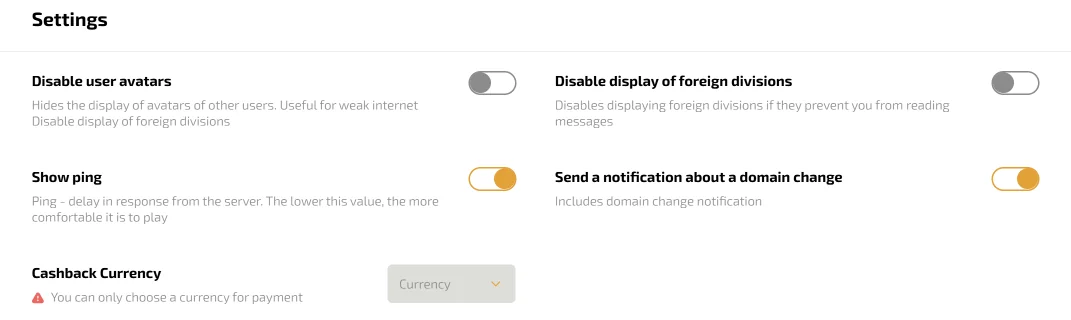
Most players never open the settings block in the profile. It holds five switches, and a minute spent there makes daily play noticeably smoother.
The block is part of the Personal Area, below the Division progress. Each switch takes effect at once, with no save button. Turning a switch back reverses the change just as fast.
1. Disable user avatars
This switch turns off the pictures of other players across the site. Pages load lighter, which helps on a weak mobile connection or a busy public network.
Your own avatar remains visible to others. The avatar guide shows how to build one worth seeing.
2. Disable display of foreign divisions
Other players' Division badges appear next to their names in chat. A busy conversation fills up with them, and this switch removes the badges from your screen.
The badges themselves come from the monthly Divisions, which the Dragon Money bonus page lists among the regular perks.
3. Show ping
Ping is the delay between your device and the server. The switch puts the number on screen, and a lower figure means a smoother game.
The value changes with the network, so a phone on mobile data shows a different ping from home Wi-Fi.
It matters most for Double and the live tables, where a round runs on a countdown. A high ping is a signal to change networks before the next bet.
4. Send a notification about a domain change
This is the switch to turn on first. When the main address changes, a notice brings the new one, so a block never cuts you off.
It pairs with the Dragon Money mirror page, which explains how the move between addresses works.
5. Cashback Currency
The last field picks the currency of the weekly cashback. The list offers only the currencies available for payments, so the money always comes in a form the cashier accepts.
Many crypto players choose USDT in this field, so the cashback matches their balance. The chat guide covers the social switches in more detail.
A quick setup
A sensible starting point for most accounts looks like this:
- domain-change notice on for everyone
- ping on for Double and live tables
- avatars off on a slow connection
The settings open after a Dragon Money login and follow the account to any device.
The games of the Dragon Money casino work exactly as before, whatever the switches show.