Every new account starts with a plain grey silhouette. The profile holds a full character editor, and a few minutes there turn that icon into a figure of your own.
The editor opens under the Avatar tab of the profile. Changes appear in the chat, where other players see your character next to your messages.
The six groups of options
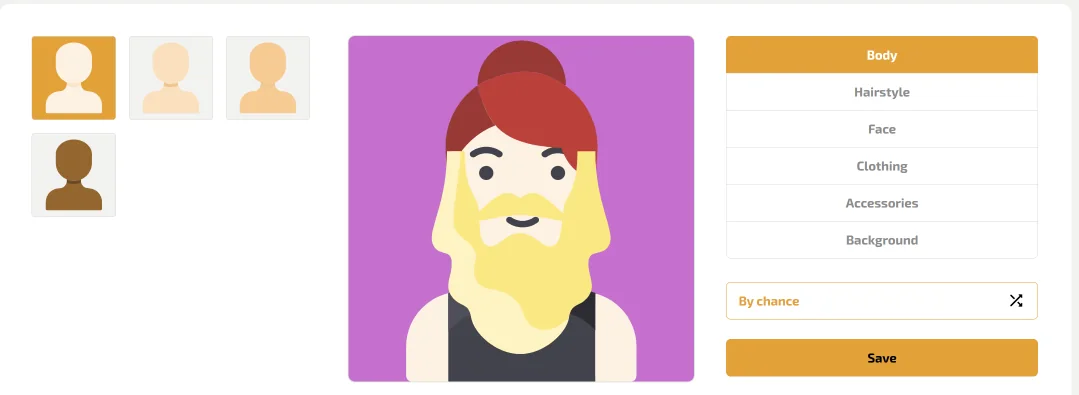
The panel on the right lists the parts of the character in a fixed order:
- Body, with four starting figures in different skin tones
- Hairstyle
- Face
- Clothing
- Accessories
- Background, the colour behind the figure
Each group opens its own row of choices, and the preview in the middle updates at once. Nothing locks in until you press Save, so ten hairstyles in a row cost nothing.
The groups work independently of each other. You can change the clothing without touching the face, or try a new background on a finished character.
Building a character in four steps
A quick route through the editor looks like this:
- Pick one of the four ready figures in the top left corner.
- Go through the groups from Hairstyle down to Background.
- Press By chance to let the editor suggest a random mix.
- Press the Save button once the result looks right.
Changing the look later takes the same few clicks, and the old version remains until you press Save again.
The random button suits anyone short on ideas. One press shuffles every group, and a second press gives a fresh combination. You can still adjust a single detail before saving.
Where your avatar appears
The character shows up in the chat and next to your name. Accounts with the Amethyst Division or higher also carry a level badge there.
Monthly perks of that kind are listed with the other regular offers on the Dragon Money bonus page.
Players on a slow connection can turn off other people's avatars with one switch in the settings. The switch changes only their own screen, so your character remains visible to the room.
One character on every device
The avatar belongs to the account, so it looks the same after a Dragon Money login from a phone or from a laptop.
It also survives a move to a Dragon Money mirror, because the profile is part of the platform and not of one address.
A finished character takes a minute or two. The games of the Dragon Money casino are one click away in the left sidebar once it is saved.