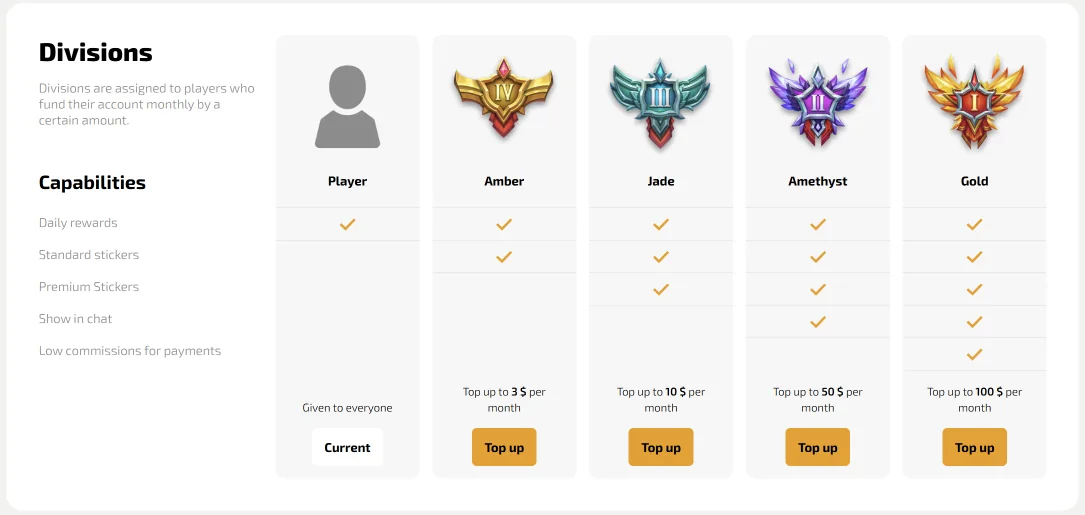
Divisions are the loyalty ladder of Dragon Money. They follow the deposits you make during a calendar month and add new perks as the total grows.
Nothing needs a subscription or a separate fee. The level comes from money you already put on the balance, and it resets with every new month.
The five levels
The Divisions page shows the thresholds in dollars, as the platform counts them:
| Division | Deposits in the month | What it adds |
|---|---|---|
| Player | Given to everyone | Daily rewards |
| Amber | 3 $ | Standard stickers |
| Jade | 10 $ | Premium stickers |
| Amethyst | 50 $ | Your Division shown in chat |
| Gold | 100 $ | Lower commissions on payments |
Player is the starting level of every account. It already brings the daily rewards, so even a quiet month gives something back.
Each level keeps everything from the one below it. Gold therefore brings the daily rewards and both sticker sets together with the chat badge and the payment discount.
The Dragon Money bonus page lists the Divisions next to the other regular offers of the casino.
How the monthly count works
The count starts again on the first day of each month. The profile shows how much remains to the following level, for example three dollars until next month.
Every deposit at the cashier counts, whatever the method. A card payment and a crypto transfer add to the same monthly total.
The social side
Stickers and the badge belong to the chat, where they show your level to the room. The chat guide explains how they look and how to turn off other players' badges.
The badge appears from Amethyst upwards, which makes it the most visible mark of a regular player in the room.
The first three levels come quickly for regular players. They make the chat more colourful from the first days of the month.
The money side
Gold is the level that touches payments directly. Lower commissions help most for players who move money in and out several times a month.
The crypto payments guide lists the coins and payout times at the cashier.
Where to follow your level
The Divisions entry opens from the top menu after a Dragon Money login. A progress bar shows the current level and the amount left to the following one.
The same page works on a Dragon Money mirror with the same progress.
Every game in the Dragon Money casino lobby remains open to all five levels alike.